


Premium at $30 a month adds Grok Bot, while ChatGPT Pro from $100 includes Dot.
- Both have an $8 plan
- Fast, Auto, Expert, Heavy modes
- Premium adds Grok Bot
- ChatGPT Plus schedules tasks
New to Grok Bot?
Get two weeks free on us.
Short answer
Grok and ChatGPT both offer free access and an $8 monthly entry plan. Choose Grok for its X and Cursor bundle, or ChatGPT Plus for scheduled tasks, custom GPTs and expanded Codex usage. Grok Premium adds Grok Bot; ChatGPT Pro includes Dot.
| Grok | ChatGPT | |
|---|---|---|
| Entry paid plan | Plus: $8/month | Go: $8/month |
| Reasoning | Fast, Auto, Expert and Heavy modes | Advanced reasoning on Plus; Pro reasoning on Pro |
| Coding | Build and Cursor | Codex |
| Always-on agent | Grok Bot with Premium | Dot with Pro |
Grok vs ChatGPT Prices
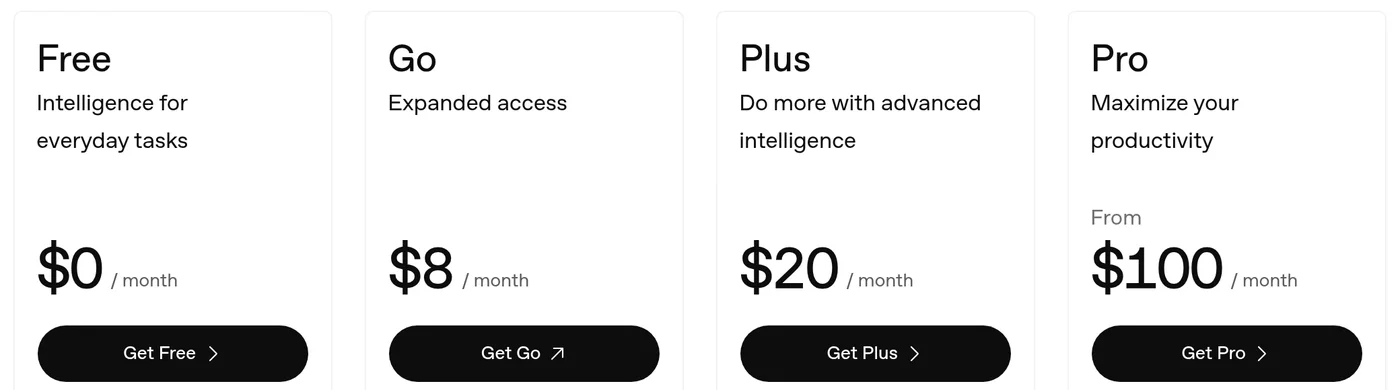
ChatGPT Plus sits between Grok Plus and Premium on price. The prices below are monthly; Grok also offers annual billing.
| Monthly price | Grok | ChatGPT |
|---|---|---|
| $0 | Free | Free |
| $8 | Plus | Go |
| $20 | — | Plus |
| $30 | Premium | — |
| $100 | Super | Pro 100 |
| $200 | Ultra | Pro 200 |
| $500 | — | Pro 500 |
What Does Each Plan Include?
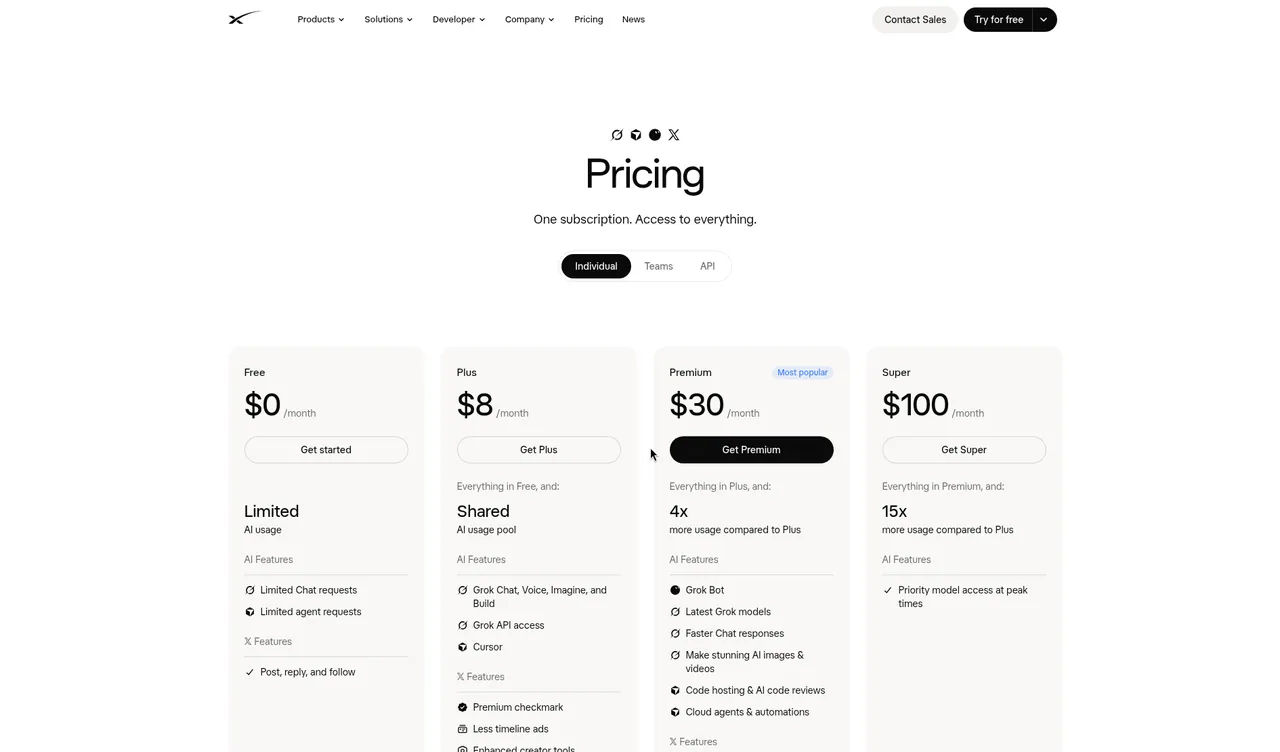
The same monthly price does not buy the same bundle. ChatGPT Go increases access to ChatGPT tools, while Grok Plus combines AI products with Cursor and X benefits.
| Plan | What it includes |
|---|---|
| Grok Free | Limited Chat and agent requests. |
| Grok Plus | Chat, Voice, Imagine and Build, Grok API access, Cursor, an X checkmark and fewer ads. |
| Grok Premium | Four times Plus usage, Grok Bot, faster Chat responses, code hosting, AI code reviews, cloud agents and automations. |
| Grok Super | Fifteen times Plus usage, priority access at peak times and 1080p videos up to 15 seconds. |
| Grok Ultra | Fifty times Plus usage. |
| ChatGPT Go | More messages with tools, uploads, image creation and voice chats, plus longer memory. |
| ChatGPT Plus | Advanced reasoning with GPT-6, expanded deep research, projects, scheduled tasks, custom GPTs and expanded Codex usage. |
| ChatGPT Pro | Pro reasoning with GPT-6 Astra, Dot, maximum deep research and longer Codex and ChatGPT Work sessions. |
For the full bundle, see Grok pricing. ChatGPT Free does not include scheduled tasks. ChatGPT Plus and Pro use monthly billing; Grok annual prices are $80 for Plus, $300 for Premium, $1,000 for Super and $2,000 for Ultra.
How Do Grok Limits Work?
Paid Grok seats have a weekly pool shared across eligible first-party Grok and Cursor usage. A chat message uses less compute than a high-quality video or a long coding task, so the same pool can last for different amounts of work.
- Open Settings → Usage to see the progress bar, reset date and time, and breakdown by product, including Chat, Build, Voice, API, and image and video generation.
- Check the Extra Usage Credits balance on the same screen. On the web, buy credits from $5; they expire one year after purchase.
- Set Auto Top Up with an amount and a monthly cap if you want automatic purchases. Once paid weekly usage runs out, separate free-tier Chat and Voice limits remain available and reset on their own schedule.
Third-party models in Cursor are paid Additional Usage, outside the included weekly pool. Self-serve team seats each have their own pool; the team shares a prepaid balance for supported Additional Usage.
Grok Modes vs ChatGPT Reasoning
Grok’s mode picker describes how a response is produced. ChatGPT describes its reasoning options by plan: Plus includes advanced reasoning with GPT-6, while Pro includes Pro reasoning powered by GPT-6 Astra.
| Grok mode | Picker description |
|---|---|
| Fast | Quick responses; the default when signed out. |
| Auto | Chooses Fast or Expert. |
| Expert | Thinks hard with Grok 4.7. |
| Heavy | A team of Experts using Grok 4.7. |
When signed out, Auto, Expert and Heavy ask you to upgrade; check the picker for access on your plan. In the composer, Shift+Tab cycles modes and Cmd+/ opens the model picker. The Expert mode guide explains these choices in more detail.
Files and Uploads in Grok
Grok can analyze uploaded documents, data, images, audio and video. ChatGPT Go offers more uploads than Free; Plus also includes projects and expanded deep research. Grok’s upload limits depend on the device and file.
- In a Grok chat, select the + beside the message box and choose files. On the web, you can also drag and drop them.
- Attach multiple files to one message. The web supports up to about 100 files at once; Android supports up to 20, and iOS supports multiple files.
- Ask for a specific result, such as comparing two DOCX files, extracting tables from a PDF or finding trends in a CSV.
| File detail | What to know |
|---|---|
| Size | Most documents, images, code and audio files can be up to 150 MB each. |
| Formats | Examples include PDF, DOCX, XLSX, PPTX, CSV, PNG, MP3 and MP4. |
| Large PDFs | For PDFs over 100 pages, specify actual page numbers when asking about a passage. |
| Embedded images | Images inside non-PDF documents may not be processed visually. |
| Storage | On the web, use grok.com/files to delete files and free space. |
Grok also has built-in Skills for Word, presentations, spreadsheets and PDFs. For an app, describe what you want in Grok Build; it builds in chat and can publish to grok.me.
Connect Grok to Your Apps
Grok connectors are available to all users. They let Grok access external services within a conversation, and Grok can use their tools automatically when a question relates to a connected service.
- Open grok.com/connectors and choose New Connector.
- Select a service and complete its sign-in. Grok requests the permissions it needs.
- Ask a question about the connected service, such as a question about a file in Google Drive or an event in Google Calendar.
| Connector type | Examples and requirements |
|---|---|
| Built-in | Gmail and Google Calendar, Google Drive, OneDrive, Outlook, Microsoft Teams, SharePoint and Salesforce. |
| Catalog | Box, Canva, GitHub, Linear, Notion and Vercel. Meltwater requires an active subscription. |
| Custom | Choose New Connector → Custom, enter an MCP server URL and complete any required authentication. The server must be reachable on the public internet. |
For Grok Business and Enterprise, an admin first provisions a connector in the cloud console before members can use it. See Grok connectors for setup details. Grok Bot app connections are set up separately.
Coding, Agents and Scheduled Work
Grok Plus includes Build and Cursor; ChatGPT Plus includes expanded Codex usage. Grok Build in chat can create an app from a description, while Grok Build CLI is a separate terminal coding agent.
| Task | Grok | ChatGPT |
|---|---|---|
| Schedule work | Automations run once, daily, weekdays, weekly, monthly or yearly, or from email triggers. | Scheduled tasks are included with Plus. |
| Use an always-on agent | Grok Bot is included with Premium and above. | Dot is included with Pro. |
| Work across devices | Automations work on grok.com and the iOS and Android apps. | ChatGPT Work is available on desktop, web and mobile with Plus. |
For the agent comparison, read Grok Bot vs ChatGPT agents. Grok vs Grok Bot explains the difference between Grok chat and the agent; Grok Bot vs Claude compares another agent option.
Which Should You Choose?
Start with the feature that determines your plan. Free access lets you begin with either product; the paid tiers add different tools and allowances.
| Your priority | Plan to consider |
|---|---|
| Cursor and X benefits with chat | Grok Plus bundles both at $8 monthly. |
| Custom GPTs and scheduled tasks | ChatGPT Plus includes both at $20 monthly. |
| An always-on agent at a lower entry price | Grok Premium includes Grok Bot at $30 monthly; ChatGPT Pro includes Dot from $100 monthly. |
| Longer high-resolution video | Grok Super includes 1080p videos up to 15 seconds. |
| Annual individual billing | Grok offers annual prices; ChatGPT Plus and Pro are monthly. |
Grok prices exclude tax. Cancel at least 24 hours before renewal to avoid the next charge. ChatGPT Business is available for teams of two or more; Grok team plans offer Premium, Super and Ultra seats, which can be mixed.
FAQ
What Are the Grok vs ChatGPT Differences?
Quick answer: Grok bundles Cursor and X benefits with paid plans, while ChatGPT Plus includes scheduled tasks and custom GPTs. Grok Premium includes Grok Bot, and ChatGPT Pro includes Dot.
Is Grok or ChatGPT Free?
Quick answer: Both have free plans. Grok Free includes limited Chat and agent requests, while ChatGPT Free does not include scheduled tasks.
Is Grok Better Than ChatGPT?
Quick answer: The choice depends on the tools and plan features you need. Grok Plus includes Cursor and X benefits, while ChatGPT Plus includes custom GPTs and expanded Codex usage.
Which Has an Always-on Agent?
Quick answer: Grok Premium includes Grok Bot, and ChatGPT Pro includes Dot. Premium costs $30 monthly, while Pro starts at $100 monthly.
Which Is Cheaper?
Quick answer: Grok Plus and ChatGPT Go both cost $8 per month. ChatGPT Plus costs $20 per month and Grok Premium costs $30 per month.
Is Grok or ChatGPT Better for Coding?
Quick answer: Grok Plus includes Build and Cursor, while ChatGPT Plus includes expanded Codex usage. Grok Build can create an app in chat, and Grok Build CLI is a separate terminal agent.
Swarm School is an independent site. We’re not affiliated with xAI or OpenAI.
Sources
- Official documentation https://docs.x.ai/x-subscription/usage-limits
- Official documentation https://docs.x.ai/grok/overview
- Official documentation https://docs.x.ai/grok/faq
- Official documentation https://docs.x.ai/grok/connectors
- Official documentation https://chatgpt.com/pricing
- ChatGPT pricing https://chatgpt.com/pricing
- ChatGPT Pro https://help.openai.com/en/articles/9793128
- xAI pricing https://x.ai/pricing
- Grok skills https://x.ai/news/grok-skills
- Grok automations https://x.ai/news/grok-automations
Features change; check the official docs for current details. All comparisons →
Related Guides
Grok Bot vs ChatGPT Agents: Which Is Better for Automating Tasks?
Grok Bot vs ChatGPT agents for automating tasks, compared from xAI's and OpenAI's official docs: ChatGPT Work, scheduled tasks, Dot, prices and which to pick.
Grok Expert Mode: What It Is and When to Use It
Understand Grok Expert mode, compare Fast, Auto and Heavy, and choose the right mode for your next question.




Grok Connectors Explained: What They Are and How to Add Them
Understand Grok connectors, compare built-in and custom services, and follow the steps to connect your accounts safely.

Is Grok AI Free? Plans, SuperGrok and Grok Bot
Grok is free to start; paid plans are Plus $8, Premium $30, Super $100 and Ultra $200 a month. Grok Bot needs Premium or higher (or Teams, Enterprise or a paid Cursor plan).