
Create, search and manage notes in your local Obsidian vault with Grok Bot.
- Add to Grok Bot
- Create and edit notes
- Capture web pages
- Make Bases and Canvas files
New to Grok Bot?
Get two weeks free on us.
Short answer
Obsidian for Grok Bot is Obsidian’s official plugin. Open its page and select Add to Grok Bot, then your Bot creates, searches and manages notes in your local vault.
What Your Bot Can Do in Obsidian
- NotesCreate and edit notes in your vault.
- SearchFind notes in your vault.
- LinksUpdate links between notes.
- Web captureExtract clean Markdown from web pages.
- BasesCreate Bases with views, filters, formulas and summaries.
- CanvasCreate and edit Canvas files.
- Sync and PublishSync changes to your devices with Obsidian Sync and publish with Obsidian Headless.
- TemplatesRender Markdown templates from JSON or CSV data.
Add It to Grok Bot
Obsidian for Grok Bot is made by Obsidian. See Obsidian Help and @obsdmd on X.
- Open Obsidian for Grok Bot.
- Select Add to Grok Bot.
What to Have Ready
For the Obsidian CLI skill, have these ready on your computer.
| Requirement | What to check |
|---|---|
| Obsidian desktop app | Keep it running. |
| Obsidian CLI | Turn it on in Obsidian. |
| Local vault | Choose the vault you want your Bot to use. |
| Grok Bot | Set up your Bot to run commands on your computer. |
The Markdown, Bases and Canvas skills only need your Bot to read and write files in your vault.
The Skills Inside
The seven skills are open source on GitHub.
| Skill | What it does |
|---|---|
obsidian-markdown | Creates and edits Obsidian Flavored Markdown notes. |
obsidian-bases | Creates and edits Bases with views, filters, formulas and summaries. |
json-canvas | Creates and edits Canvas files. |
obsidian-cli | Works with your vault through Obsidian CLI. |
obsidian-headless | Syncs and publishes vaults from the command line with Obsidian Headless. |
defuddle | Extracts clean Markdown from web pages. |
knap | Renders Markdown templates from JSON or CSV data. |
Defuddle, Knap and Obsidian Headless are separate tools. If one is missing, its skill asks before installing it from npm.
Try These First
Save [page URL] as a Markdown note in my Obsidian vault. Include the source link.
Create a Base for the notes in my Books folder. Show the title, author and reading status.
Make a Canvas for [project name]. Add cards for the goal, milestones and open questions.
Point your Bot at the vault you want it to read. Notes it reads become part of the conversation.
Choose Your Next Guide
| You want to… | Read next |
|---|---|
| Connect more apps | Grok Bot connectors |
| Work with skills | Grok Bot skills |
| Use Apple Notes | Grok Bot Mac apps |
| See every November update | Grok Bot November updates |
Get the Free Power User Guide
Continue with the free Grok Bot Power User Guide.
FAQ
Who Makes the Obsidian Plugin?
Quick answer: Obsidian makes Obsidian for Grok Bot.
How Do I Add the Plugin?
Quick answer: Open Obsidian for Grok Bot and select Add to Grok Bot.
What Does Obsidian CLI Need?
Quick answer: Keep the Obsidian desktop app running, turn on Obsidian CLI and give your Bot permission to run commands on your computer.
What Happens to Notes It Reads?
Quick answer: Notes your Bot reads become part of the conversation.
Swarm School is an independent site. We’re not affiliated with xAI or Cursor.
Sources
- @obsdmd on X (https://x.com/obsdmd/status/2123484964268413341)
- Obsidian for Grok Bot (https://x.ai/bot/plugin/88871845)
- Obsidian Help (https://help.obsidian.md/skills)
- Obsidian skills on GitHub (https://github.com/obsidianmd/obsidian-skills)
Swarm School is independent and not affiliated with Grok Bot’s makers. Features change; check the official docs for current details.
Related Guides

Grok Bot Connectors: What You Can Connect
Every Grok Bot connector we could confirm in xAI's and Cursor's docs, what each one can do, and how to connect apps without giving your Bots too much access.

Grok Bot Skills: How to Write, Save and Teach Them
Learn how to write, save and teach Grok Bot skills, and use reusable instructions for recurring work.

Grok Bot Mac Apps
Grok Bot on Mac can use Messages, Mail, Notes, Reminders, Calendar, Location and Contacts. See what each app does and how Mac compares with the phone.
Can Grok Bot Use My Own Computer?
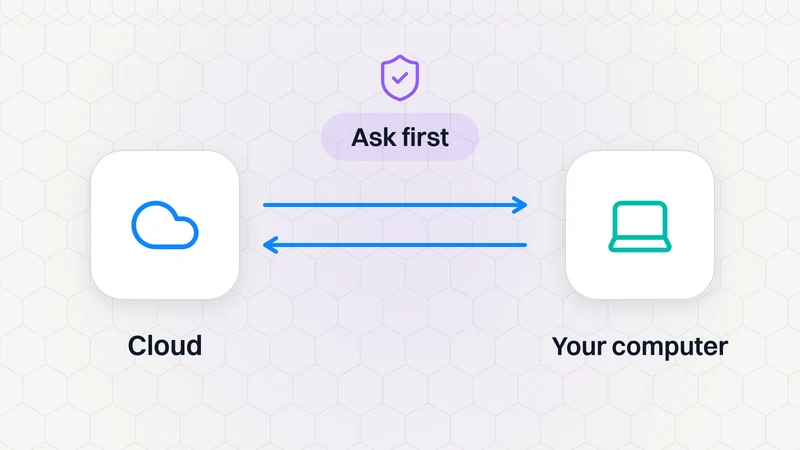
Yes, if you allow it. Settings → Computer → Execution on this computer lets Bots open files and run tasks on your machine: Always allow, Ask every time or Never allow.