
Your Bot calls businesses or people you know, and nothing dials until you tap Call.
- Write a clear call brief
- Approve every dial
- Follow the live transcript
- Know the 10-call limit
New to Grok Bot?
Get two weeks free on us.
Short answer
Grok Bot’s built-in phone calling makes outbound calls to businesses or people you know, with your approval before every dial. It’s native and included, with US-only access and limits shared across your account.
What It Can and Can’t Do
Start with who you’re calling and what you need done.
| Can | Can’t |
|---|---|
| Call businesses or people you know | Receive calls or SMS; have a bot phone number |
| Prepare a call for your approval | Dial before you tap Call |
| Show a live transcript and let you intervene | Browse or call APIs mid-call |
| Return the transcript to the bot afterward | Replace the brief with live research |
Phone Calling Is a Separate Feature
This is outbound calling to another person, with a brief prepared before dialing.
It is not talking to your bot in voice chat. It is also distinct from the Grok Bot phone app. Keep those guides handy if you meant speaking with your bot or using it on your phone.
How a Call Works
The bot prepares; you approve; the agent makes the call.
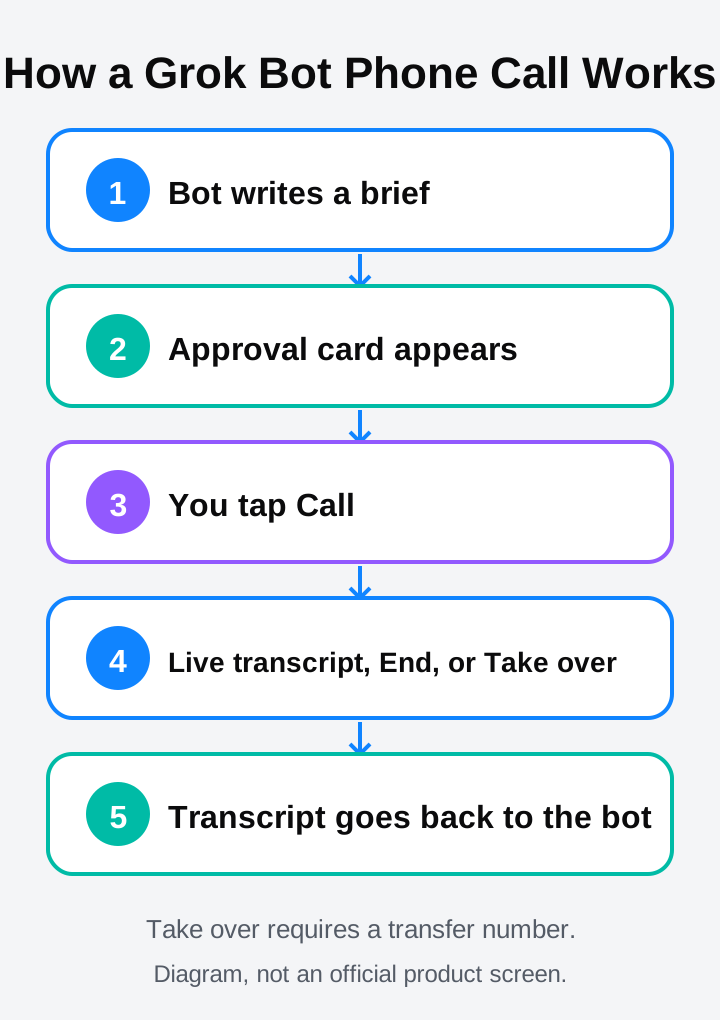
- The bot writes the brief.
- An approval card appears; it expires after 30 minutes.
- You tap Call. Only then does it dial.
- The agent identifies itself; you follow the transcript or intervene.
- Afterward, the bot gets the transcript.
When You Need to Step In
Stay available for questions the brief doesn’t answer.
If the agent doesn’t know an answer, a question card appears in chat and it waits about 60 seconds for your reply. You can end the call, or use Take over to move it to your phone if you provided a transfer number. The recording and transcript stay on the call card for 30 days.
The Limits
These limits apply to built-in calling across your account.
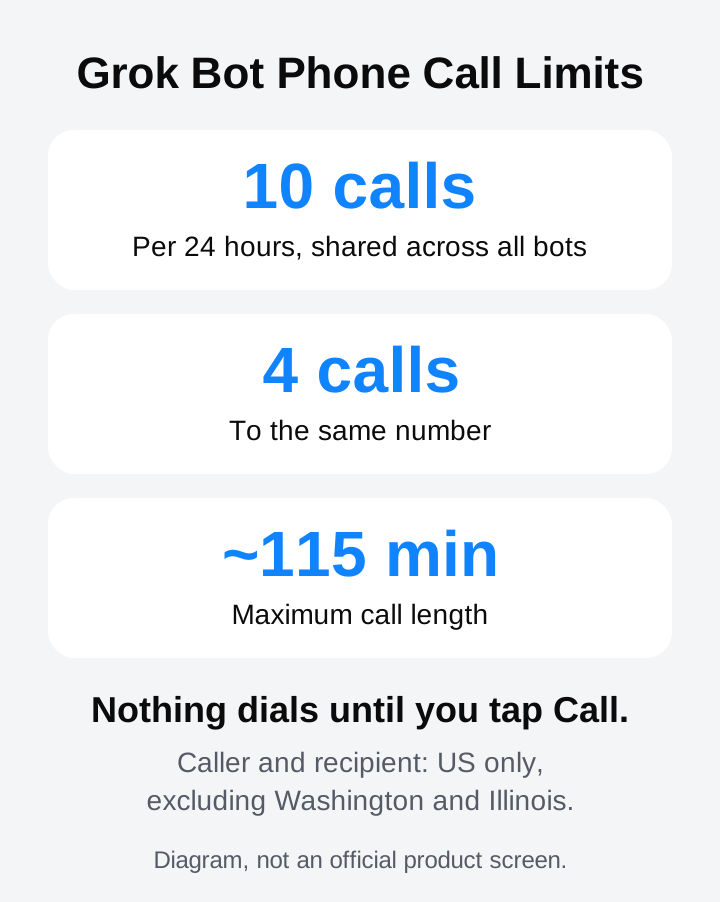
- 10 calls per 24 hours, shared across all bots; at most 4 to the same number.
- Each call can last up to about 115 minutes.
- Both caller and recipient must be in the US, excluding Washington and Illinois.
- No emergency, police, crisis or premium-rate numbers.
Calls That Aren’t Allowed
An approval tap doesn’t make every kind of call permitted.
| Reference |
|---|
| Mass calls and robocalls. |
| Telemarketing, sales and cold outreach. |
| Surveys, polling and political calls. |
| Debt collection and impersonation. |
How to Write a Great Call Brief
The agent can’t browse or call APIs mid-call. Its knowledge comes from the brief the bot writes before dialing.
- One clear goal: say what the call should accomplish.
- Must-know facts: supply the information needed for that goal.
- Likely questions and answers: prepare responses before dialing.
- Steering back: explain how to return to the goal if the conversation drifts.
- Escalation: specify what needs your answer or involvement.
Sample Call Brief
Sample only: a writing example, not an official product screen or a completed call.
Goal: [One outcome for this call.]
Facts: [Information the agent needs before dialing.]
Questions: [Likely questions, with answers you supply.]
Steering: Return to the stated goal if the conversation drifts.
Escalation: Ask me about anything the brief doesn’t answer.
Scheduled Calls Still Need Your Tap
Routines can prepare a scheduled call, but you still have to tap Call.
A schedule doesn’t remove the approval step. See the routines guide when planning a call ahead of time, and remember that the approval card expires after 30 minutes.
What Happened in Our Test
In our test, an 8.5-minute call to the owner worked and got through iPhone call screening.
FAQ
Can Grok Bot Receive Calls or Texts?
Quick answer: No. Built-in calling is outbound only. There is no inbound calling, SMS or phone number for the bot.
Does Anything Dial Before I Tap Call?
Quick answer: No. Every call waits for the owner’s tap, including calls prepared by routines. An approval card expires after 30 minutes.
Can I Run Several Calls at Once?
Quick answer: Don’t assume several calls can run at once. Plan one call at a time.
Can I Change the Agent’s Introduction?
Quick answer: No. The agent always opens by identifying itself as a virtual assistant calling for the owner on a recorded line. That introduction can’t be changed, and the agent can’t be given a persona.
Need Calling at Bigger Scale?
For support lines, dialers or lead follow-ups, look at calling-platform plugins such as Twilio or ElevenLabs voice agents.
Consider US consent rules for automated calls. These are separate options to evaluate; the built-in limits and prohibited-call categories above still govern Grok Bot’s native calling.
Sources
Swarm School is independent and not affiliated with Grok Bot’s makers. Features change; check the official docs for current details.
Related Guides
How Do I Use Voice Chat in Grok Bot?
Leave the message box empty and click the waveform button (Start voice chat) at the right of the composer. The Bot talks back until you hang up.
Can I Use Grok Bot on My Phone?
Yes. Grok Bot has a companion app for iPhone (iOS 18+) and Android (9+). Your Bots and chats sync with the desktop app, and work keeps running when your phone is locked.
How to Set Up Grok Bot Routines That Don't Go Wrong
A plain-English guide to Grok Bot routines: schedule vs. event, the seven-part routine brief, testing safely, three starter routines, and the limits worth knowing.

How to Use Grok Bot: a Practical Beginner's Guide
Learn how to set up Grok Bot, give a Bot a job, connect apps, set approval boundaries and build reusable skills.